What Focuster is
Focuster is a planner that does the scheduling for you. You write down what you want to do. Focuster finds time for it on your calendar.
Three ideas
Actions. An Action is one thing you want to do, such as "Call the accountant". Each Action has a title, a duration, and a day you plan to do it.
Your calendar. Focuster reads the calendars you connect. Your meetings and other events are busy time. The time left inside your work hours is free time.
Automatic scheduling. Focuster puts your Actions into your free time, in the order of your list. If a meeting moves or a new one arrives, Focuster moves your Actions to fit. You do not rearrange your day by hand.
The main screen
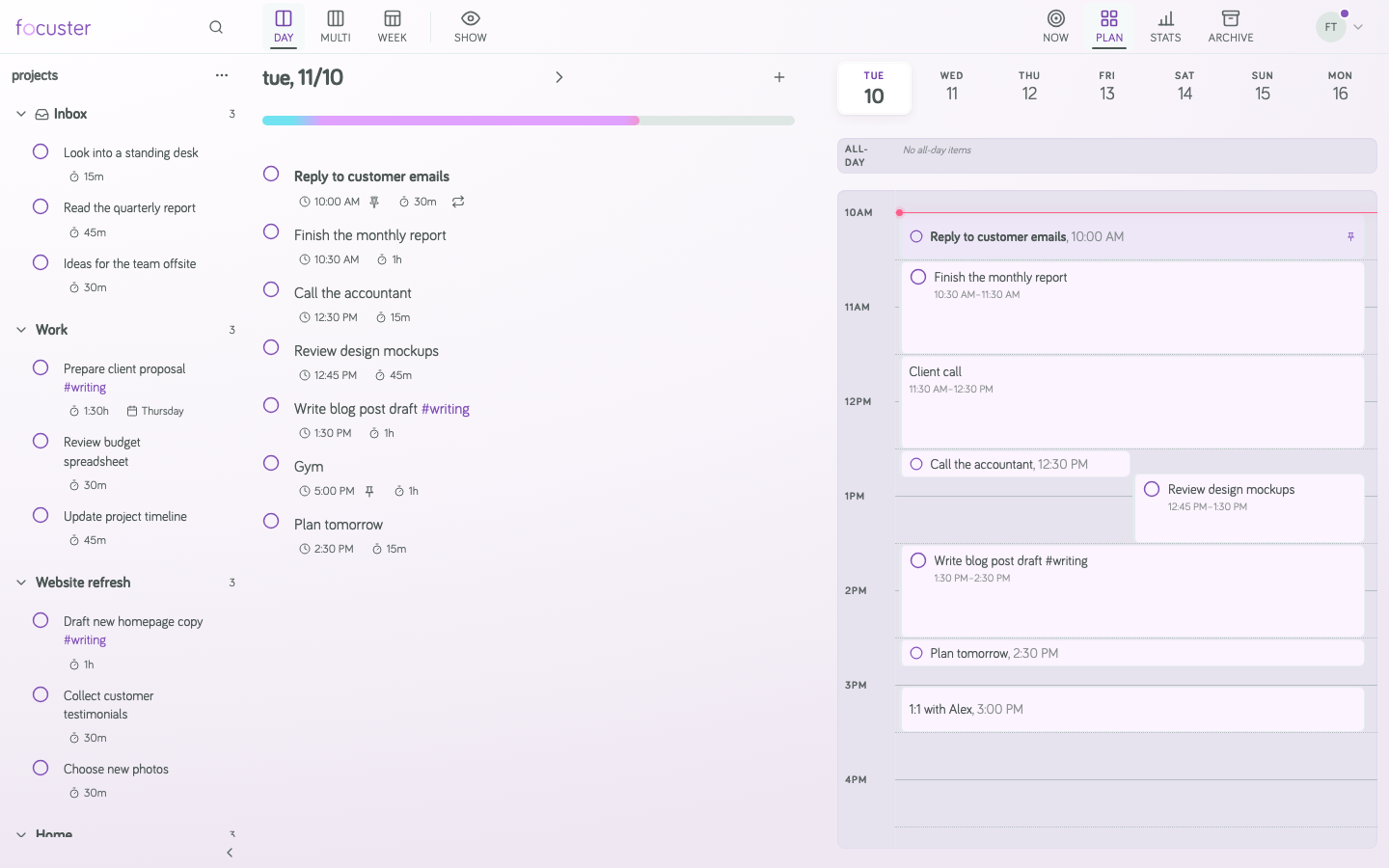
On a computer, the main screen has three parts:
- Projects, on the left. The Inbox and your Projects hold Actions that you have not planned for a day yet.
- The Day List, in the middle. These are the Actions for the day you are looking at. The order of the list is your priority.
- The calendar, on the right. It shows your events and the times Focuster picked for your Actions.
Use Day, Multi and Week at the top to change how many days you see. Use Now to see only the Action to do next.